In a world where the “things” on your network such as laptops, phones, cameras, and printers are increasingly targeted by attackers, print infrastructure deserves the same level of security attention once reserved for servers and endpoints. Documents left on output trays, unencrypted print traffic, unpatched firmware, and data stored on multifunction printer hard drives are all well documented attack vectors.
HP has responded with a layered, enterprise grade approach to print security that spans hardware, firmware, cloud services, and workflow tools. This post breaks down the secure print options HP offers, explains how they work, and shows why HP Secure Print consistently places HP at the top of enterprise print security evaluations.
HP Secure Print and the Security Problem Modern Printers Create
Modern printers are effectively networked computers. They store print jobs, hold user credentials, process scanned documents, and often sit inside trusted network zones. Yet printers are frequently overlooked in security programs. Firmware updates are delayed, access controls are weak, and devices remain exposed for years.
Industry research, including findings from HP Wolf Security, highlights how printers are commonly used as an entry point for attackers. Gaps in firmware hygiene, limited lifecycle controls, and a lack of monitoring make printers an attractive target. Once compromised, a printer can capture documents, harvest credentials, or provide lateral movement inside the network.
HP Secure Print addresses these risks by treating printers as first class IT assets rather than peripheral devices.
How HP Secure Print Protects Documents, Devices, and Users
HP Secure Print is not a single product. It is a layered portfolio that secures printing at every stage, from the device hardware to the document workflow and lifecycle management. The core components include device level protection, secure job release, cloud and on premises deployment options, and secure data handling.
1. HP Wolf Security for Print: Hardware and Firmware Protection
What it is
HP Wolf Security for Print provides hardware anchored security built directly into HP printers. It includes secure boot, firmware whitelisting, run time intrusion detection, and automatic self healing. The printer continuously checks its firmware and memory to ensure only trusted code is running.
When to use it
Organizations with high security, privacy, or regulatory requirements benefit most from this foundation. Healthcare, financial services, legal firms, government agencies, and distributed enterprises all gain resilience against firmware level attacks.
Business benefits
HP Wolf Security reduces firmware level risk, shortens remediation time, and supports compliance and audit requirements. Because protection is embedded at the hardware level, many attacks are blocked before they can execute.
HP’s Defense in Depth Approach to HP Secure Print
HP Secure Print follows a defense in depth philosophy that mirrors modern zero trust security models.
-
Protect the device hardware and firmware
-
Secure the document workflow from submission to release
-
Authenticate users before printing
-
Encrypt data in transit and at rest
-
Secure the full device lifecycle from deployment to retirement
This layered model is one of the key reasons HP Secure Print stands out from software only competitors.
2. HP Secure Print: Cloud Native Secure Release
What it is
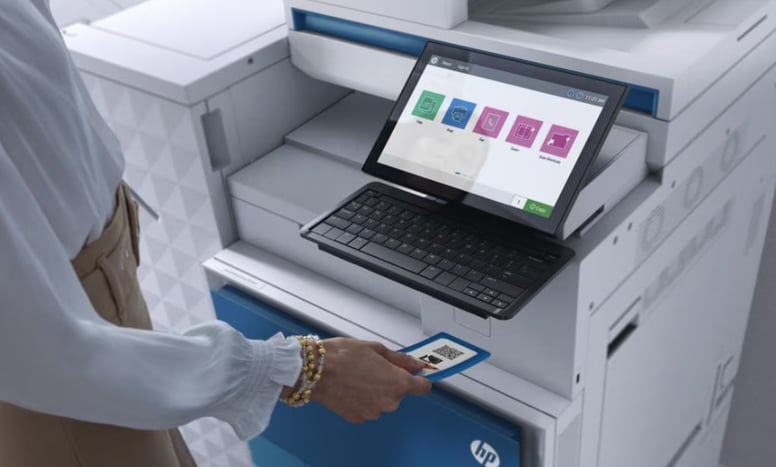
HP Secure Print is a cloud native pull printing service that allows users to send jobs to a secure queue and release them only after authenticating at an HP device. Authentication options include PIN codes, mobile apps, QR codes, and badge or card readers on supported devices.
When to use it
HP Secure Print is ideal for organizations moving toward cloud IT models or supporting mobile and hybrid workforces. It eliminates the need for on premises print servers while maintaining strong security.
Business benefits
Secure release prevents documents from sitting unattended on output trays. It reduces data leakage, cuts down on wasted paper and toner, and simplifies management for IT teams.
Why it matters
Unclaimed print jobs remain one of the most common sources of information exposure. HP Secure Print ensures documents are only printed when the authorized user is physically present.
3. HP Access Control Secure Pull Printing: On Prem and Hybrid Control
What it is
HP Access Control is HP’s enterprise print policy and secure release solution for on premises or hybrid environments. It integrates with directory services, card readers, and enterprise identity systems while providing detailed reporting and policy enforcement.
When to use it
Large enterprises and regulated industries that require strict control, auditing, and reporting often choose HP Access Control. It is well suited for organizations that prefer to keep print infrastructure on site.
Business benefits
HP Access Control supports compliance reporting, cost control, print quotas, chargeback, and detailed visibility into print usage across departments.
4. Built In HP Secure Print Features in Drivers and Firmware
HP printers and the HP Universal Print Driver include essential security features that form the baseline of HP Secure Print.
-
PIN and private print to require release at the device
-
Encrypted print jobs to protect data in transit
-
Secure job storage and disk encryption to protect data at rest
-
Cryptographic disk erase to safely decommission devices
These capabilities should be enabled in all environments handling sensitive information.
Why HP Secure Print Is Often Viewed as the Market Leader
- Hardware anchored security
HP Wolf Security provides protection that begins at the firmware and silicon level. This makes attacks significantly harder to execute compared to software only approaches. - End to end coverage
HP Secure Print spans the entire print ecosystem, including devices, networks, workflows, and lifecycle management. Customers gain a cohesive strategy rather than disconnected tools. - Cloud and on premises flexibility
HP Secure Print supports both cloud native and on premises models, allowing organizations to modernize without sacrificing control. - Security research and leadership
HP Wolf Security research highlights real world printer threats and reinforces HP’s leadership in print security innovation.
Practical Guidance for Deploying HP Secure Print
- Start with device hardening
Enable HP Wolf Security features and ensure secure boot and firmware update policies are active. - Choose the right secure release model
Use HP Secure Print for cloud simplicity and mobile workforces. Use HP Access Control for on premises control and advanced policy enforcement. - Integrate identity and access systems
Connect HP Secure Print to directory services and card readers for consistent authentication and auditing. - Leverage third party print management if required
HP devices integrate well with solutions like PaperCut or Equitrac when multi vendor support or advanced billing is needed. - Operationalize lifecycle security
Establish processes for firmware updates, monitoring, and secure device retirement using HP secure erase capabilities.
Common HP Secure Print Deployment Scenarios
-
Healthcare or legal organizations
HP Secure Print with card or PIN release protects sensitive data and supports compliance requirements. -
Retail or branch based businesses
Cloud based HP Secure Print enables users to print securely at any location without local servers. -
Government or defense contractors
HP Wolf Security combined with on premises HP Access Control provides strong audit trails and identity integration.
HP Secure Print stands out because it combines advanced hardware level protection, flexible secure release workflows, and strong lifecycle controls into a single, cohesive strategy. By addressing printers as critical security assets, HP closes a commonly ignored attack surface and delivers a practical, enterprise ready approach to print security.
Ready to Secure Your Print Environment?
To fully implement HP Secure Print and reduce risk across your print infrastructure, work with experts who understand both security and real world print operations. Contact SmartPrint, a leading Managed Print Services provider in Canada, to assess your environment, strengthen security, and design a secure print strategy tailored to your organization.